LTO Portal Login – Create LTMS Account and Login Portal
With the growth of advanced technology, LTO Philippines introduces a digital system through LTMS Portal for the convenience of citizens who want a quick way to perform time-taking tasks like vehicle renewal, number plate registration, or transfer of ownership from their home. But many of them don’t know how to register or even use the LTO Portal.
Here in this guide you will learn about the LTO Portal and get the complete step-by-step login or registration guide for 2026. We will also talk about the LTO requirements, LTO services and benefits of the online LTMS portal.
About LTO Portal (LTMS)
Most people are confused about the LTO and LTMS portal. So before moving to the next we clarify to them that LTO or LTMS portal both are the same thing. LTMS (Land Transportation Management System) is an online portal website designed by the LTO in the Philippines in 2020. From this portal Filipinos can easily access the LTO services online wherever they need.
The LTMS portal holds all the records of a vehicle which is accessible for both LTO and vehicle owner. The purpose of this portal is to manage all the records under one umbrella and also provide the convenience of Filipinos to complete their transaction online from their location rather than by visiting physically at the LTO office.
With the help of the LTP portal users can easily manage their vehicle records, apply for new plate number, driving license, check their vehicle registration validity and also complete their license and vehicle registration renewal.
You can also track your application progress online via LTO Tracker.
Requirements for LTO Portal Registration
Before you register on the LTMS Portal, you should prepare a few basic requirements. When you have all required information prepared, your registration will be fast and without any error. Here we are sharing information about LTO registration requirements which include age eligibility, technical access, and necessary documents, so prepare them before starting your process.
Age Requirements
You need to meet the minimum age before creating an account. For the registration the minimum age should be at least 17 years. For example if you are applying for the student permit via LTMS portal you should be at least 17 years old. And this age should be matched with your birthdate on your identification documents.
Technical Requirements
| Device: | You also require a device either mobile, tablet, laptop or computer which one is currently available. And also update your browser before creating an account so that you can smoothly complete your application. |
| Internet Connection: | Your device must be connected with a stable and strong internet connection, so that you can’t encounter any error during the registration process. |
| Email Address: | You should have an active or accessible email address to receive a confirmation notification or link. |
| Phone Number: | You must have a valid and active mobile number to receive an OTP. |
Documents/Information You Need to Prepare
You should prepare your personal information and supporting documents before starting the process. It will help you complete the form without any delays.
| User Type | Information You Should Prepare |
| New Applicants | Complete name, date of birth, mother’s maiden name, and full home address |
| License Holders | Driver’s license number, license expiry date, and OR number (or mother’s maiden name if needed) |
| Foreign Nationals | Nationality, ACR number, and ACR card expiry date |
| Organizations | Tax Identification Number (TIN) and business registration details (SEC or DTI) |
How to Register in LTMS Portal Online
If you want to access the online LTo services in the Philippines you must register your vehicle as per your name in the LTO system. For the registration you must need an LTMS account to login the portal. So continue with us, we are sharing a step-by-step guide here!
How to Create an account:
To create an account you must need a mobile device, laptop or PC with a strong wifi connection. Then you must know how to create an account. So follow the instructions below and create LTMS Portal account:
Step-by-Step Guide:
Open your available device and open the browser.

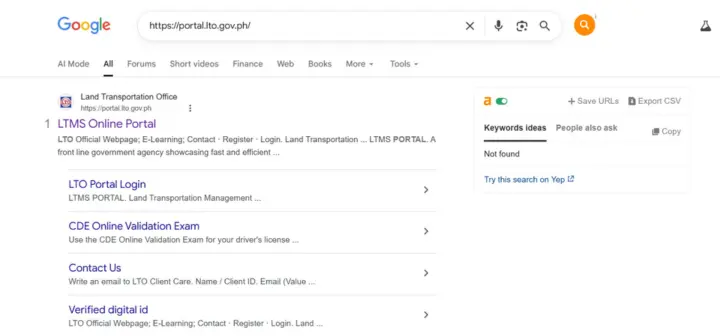
Click on the search bar and type LTMS Portal and find the official portal website. Then on it.
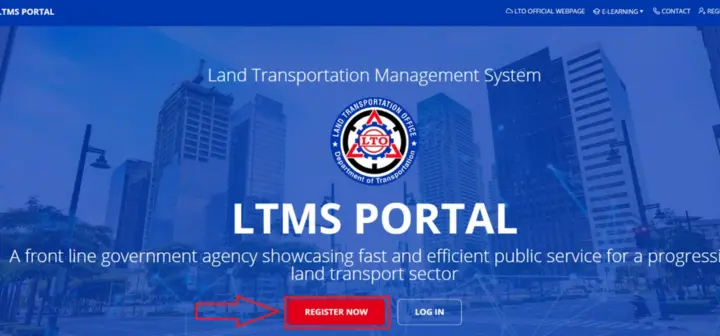
Now for the first time users, click on the “Register Now” button because you are creating your account instead of login to it. (You can login if you have an account.)
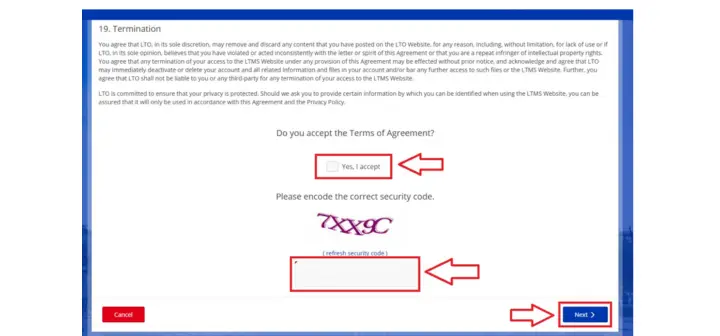
Now click on the small box and accept the LTO terms and conditions and then type the captcha code carefully without any mistake and click Next.
Now you have to select the “Enroll as an individual” because you are registering on the portal for the first time as a vehicle owner.
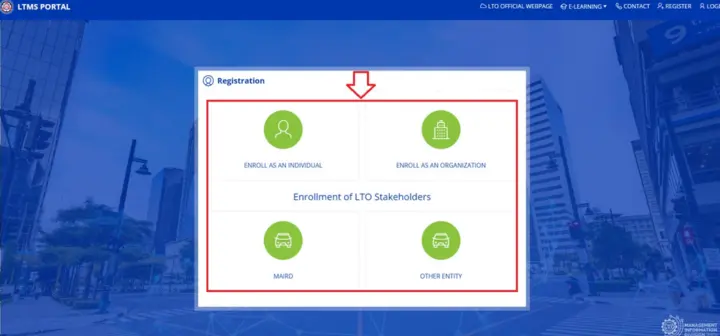
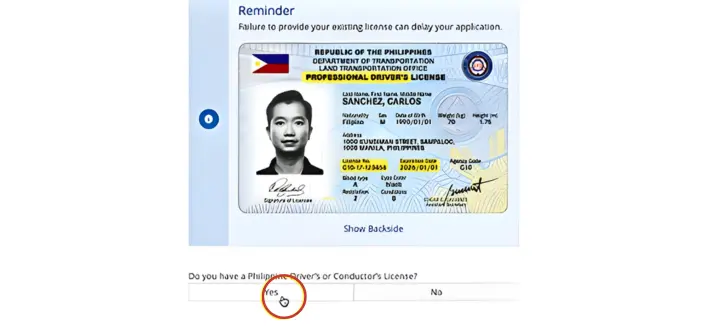
Then, select between the two options “Yes or No”. You can choose “Yes” if you have your Philippines driver’s license.
Now enter your nationality details and click Yes or No. Select “Yes” if you are a Philippine resident and then click the “Next” button.
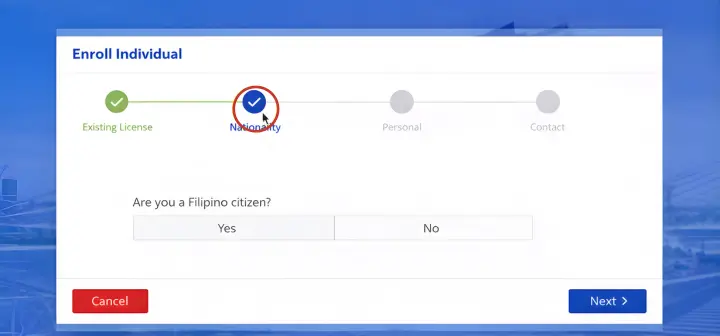
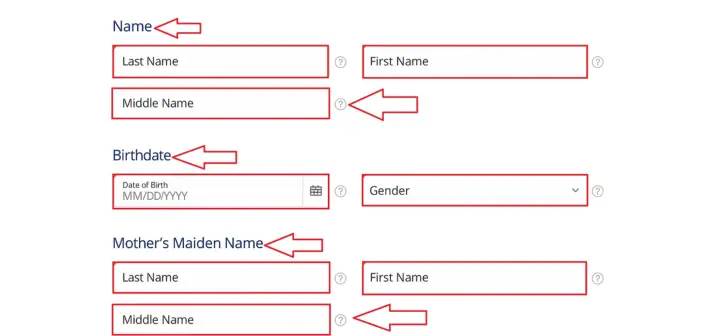
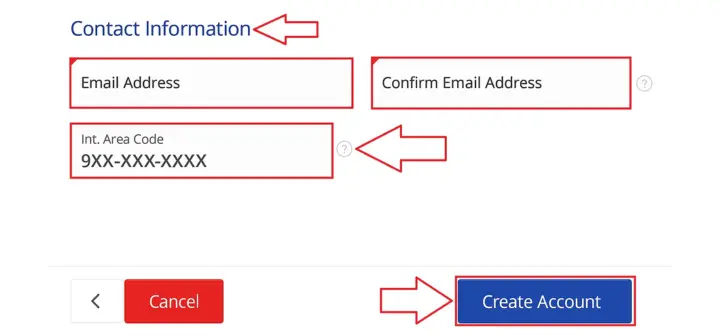
In the next step you have a form so fill in the accurate information.
Now click “Create Account”.
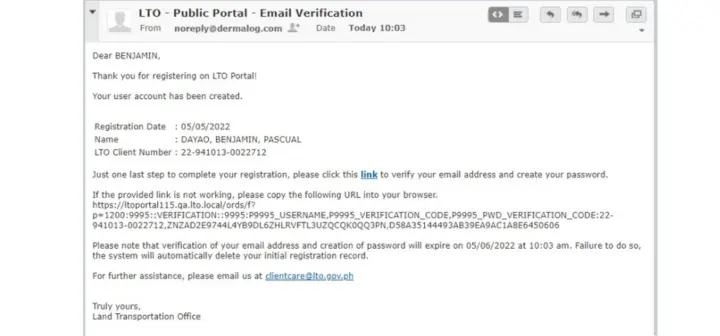
After that check your inbox for confirmation email. This email you will receive at your given email address.
From the email, click and open the link you have received.
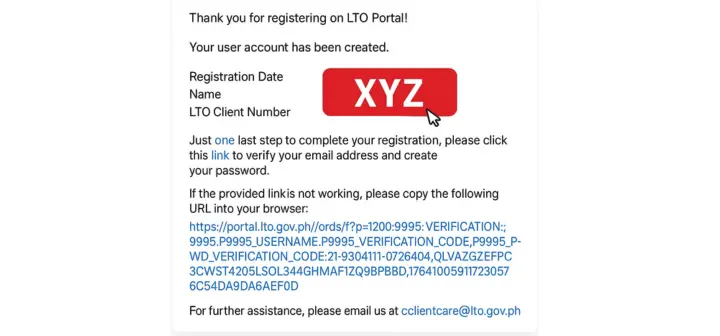
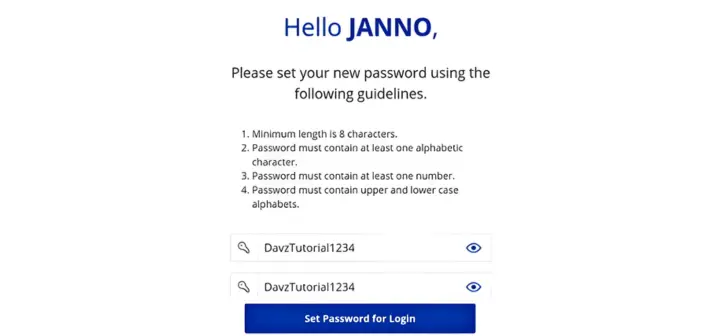
Now you have to set a strong password which should contain at least 8 characters in upper and lower case letters and numbers.
Type again your password and click on the “Set Password for Login” button.
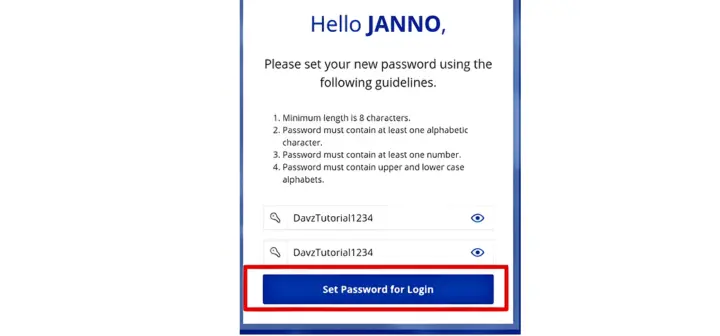
Now you can easily login your LTMS portal and apply for the student permit or check LTO violation and penalties.
Important Tips:
- You have to review your information and double-check your email and password before submitting.
- You must use the official LTO website to register yourself on the portal.
- Save your confirmation or receipt by taking screenshots or pictures.
- Your personal details must be matched with your official documents or ID.
- Use your active and valid email so that you can easily receive your confirmation notification.
- Save your account information because you can create an LTO account for once.
LTO Portal Login Requirements
There are the two main requirements which you must need before your portal login
Email Address: You must have your registered email which you have provided during the account creation process.
Password: 8 digits LTMS password which you have been set after confirmation of your account.
How to Login LTO Portal Login After Registration?
When you have successfully created your LTMS account and set your password, then you will be eligible to login to the LTO portal. Now follow the simple instructions and sign in your portal:
Step-by-step Login Guide:
Step 1: First of all open the browser and search for an official LTO Portal.
Step 2: Now click on the “Login”.
You have logged in your LTMS portal, so you can now check for LTO alarm, apply for transfer of ownership and easily upload your LTO vehicle plate.
Important Tips:
- Don’t share your email and password with anyone.
- Every time use the official lto website for smooth login.
- Save your login ID or password so can’t forget it.
Reset Forgot Password at LTO Portal
Unfortunately! you face “incorrect password” or “wrong password” error while logging in your account. If you forget your email or password, you can reset the password and access your account again. Follow the instruction below and reset your password on LTMS portal:
Steps to Follow:
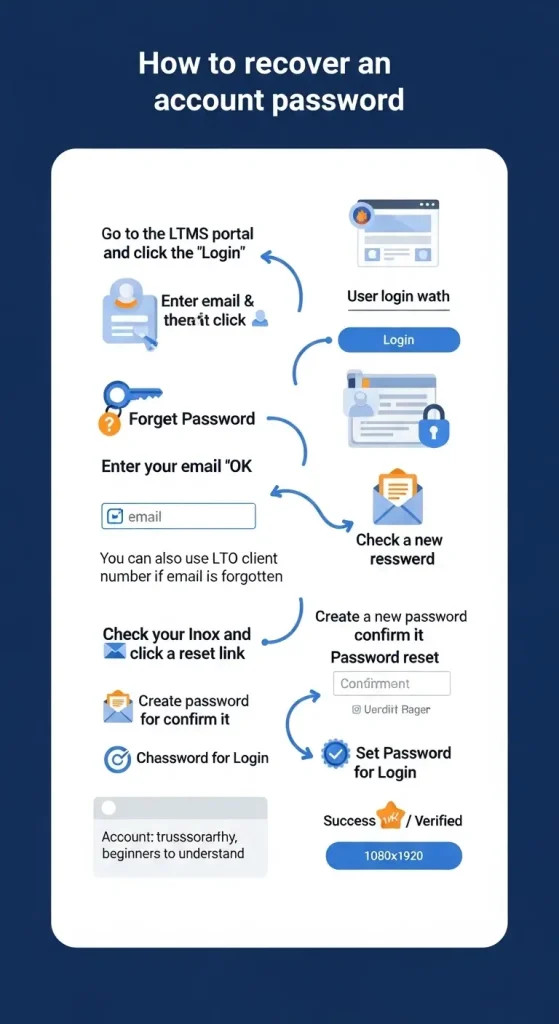
- Go to the LTMS portal.
- Click on the “Login” button.
- Now enter email and password and click “login”.
- Then select the “Forget Password” as shown in the picture.
- In the next step, enter your email and click “OK”. (Note: you can retrieve your LTO account by providing LTO client number instead of email, if you forget your registered email ID.)
- Next go to inbox and click on the link which you have received by your registered email.
- Then you can reset your password by creating a new password. Enter a new password and again confirm the password as shown in the picture and click the “set password for login” button.
- Now you have successfully recovered your account, enjoy the LTO services online.
Key Benefits of LTMS Portal Online Registration
Use the Portal Anytime, Anywhere
If you have a phone, tablet or computer you can easily access the portal at any time. You do not need to visit an lto office just to check your status or submit an application. You can manage your LTO services from home or while traveling because you only need to have internet access.
No More “Fixers” or Scams
Through the portal system you can access the official Land Transportation Office system for your work. You perform all the transactions by yourself and avoid middlemen or “fixers” who may charge extra fees. In this way you can complete your transactions safely and follow the correct process without any scams.
Faster Service at LTO Branches
You can complete some initial steps by registering online before visiting a branch. You can get an appointment online, submit your application and pay for violation fines which help you to save your time and office visits. You just visit the office only when it is necessary which leads to quicker processing.
Free E-Learning and Exam Prep
The portal provides direct access to all learning materials. With the lto online resources you can study traffic regulations and road signage and driving safety procedures at your home. You can easily practice the questions and study free of cost for driver’s license exams because it provides free study materials and practice .
Keep All Records in One Place
You can store your license details, vehicle records, and transaction history in one account. Through an online portal system you can verify your information whenever you want. You can maintain your organization and current knowledge because everything is available in one location.
Who Can Use the LTO Portal?
Filipino Citizens
Filipino citizens can use the LTO portal and create an account to use online services. They can apply for licenses, check their status updates, and manage their vehicle information easily.
Existing License Holders
Drivers who already have a current license can create an account to manage their license renewals and access their driving records. From your account, you can track violations and other available services.
First-Time Applicants
The portal is also helpful for the first-time applicants. They can easily apply for their student permits or license and then easily track their application progress through LTO tracker.
Foreign Nationals
Foreign nationals who live in the Philippines can create their registration accounts. The signup process requires them to submit valid identification together with all necessary information. After the login they will be able to use the services that are currently available.
Organizations and Businesses
Organizations can register their company vehicle operators as official members. The system makes them able to monitor multiple vehicles so they can handle their business operations in a more efficient manner.
All LTO Services You Can Access Online Through the LTMS Portal
LTO Student Permit
You can apply for a student permit and check your application status online. The system helps you prepare for your office visit because it provides needed information.
Transfer of Ownership (LTO)
You can monitor the progress of ownership transfer requests. Through the online system you know when vehicle record updates have been completed and you visit the office.
LTO Violations & Penalties
By visiting the LTO portal online you can easily check violations and your pending penalties and pay for them. It makes you up to date so that you can avoid any delays in your transactions or renewal processes.
LTO News & Updates
You can read the latest news and updates about the LTO system changes and new service offerings. You can also get the notification about the policy changes or more.
Online Tracking System
The system provides you with current status updates about your application process, so you can wait patiently and schedule your office visit. You can check either your vehicle plate number and license is ready or under process.
Vehicle Registration
Without visiting the LTO office you can get the information about the vehicle registration and renewal. You can gather your required documents and even apply online through the portal.
LTO Driver’s License
You can apply for your license or renew it and also track its status. The system makes your license application process easy and more convenient to complete.
Online Payments and Receipts
You can pay fees online and download receipts. You don’t need to perform manual payment processing.
Learn & Take Online Driving Courses
You have all the study and practice materials on the LTMS portal website. If you have the internet you can easily access the driving courses and also take the exam online.
Schedule Appointments Easily
You can book appointments in advance. You can prevent long waiting lines at the lto office and get the appointment through the portal.
Request Official Certificates
You can request online for your certificates and documents including license or plate number or OCR. The process becomes fast and smooth to complete because online document requests need your less time.
Common LTO Portal Login Issues & Fixes
There is always a possibility that you may encounter some technical issues while you are logging in your LTO portal. Here we are sharing a few common issues/errors along with possible fixes:
| Issue | Possible Reason | How You Can Fix It |
| Incorrect Username or Password | Wrong email or password entered | Check your login details and try again or use “Forgot Password” to reset |
| OTP Not Received | Weak signal or incorrect mobile number | Wait a few minutes and request a new OTP code |
| Account Not Verified | Email verification not completed | Open your email and click the verification link |
| System Not Loading | Slow internet or browser issue | Refresh the page, clear cache, or try another browser |
| Account Locked | Too many incorrect login attempts | Wait for a few minutes or reset your password |
| Server Busy or Maintenance | System update or heavy traffic | Try logging in again after some time |
LTO Support Contact details
If you have tried the fixes and still you are facing the issues then you can the LTO support and get the assistance.
| Contact Method | Details |
| [email protected] | |
| LTO Office | Visit the nearest LTO branch for assistance |
| LTMS Portal | Use the Contact Us form on the official website |
| Telephone Number | (632) 922-9061 to 66 |
| Text Hotline | Send LTOHELP to 2600 |


Final Wording
You have a step-by-step LTO portal Login guide above, follow it and register yourself on LTMS portal so you can receive all the lto services online from the comfort of your home. When you log in your portal you can monitor your application status and receive real-time updates. You get full control on managing your vehicle record and save your documents in one place.